Thursday, November 29, 2012

Hands-on: Multiple users, lock screen widgets round out Android 4.2

http://arstechnica.com/gadgets/2012/11/hands-on-multiple-users-lock-screen-widgets-round-out-android-4-2/

The official Android 4.2 Jelly Bean update began to hit Google's Nexus 7 and Galaxy Nexus devices yesterday, bringing with it multiuser support for tablets, a revamped pull-down notifications panel, a new 10-inch tablet user interface, lock screen widgets, and several other notable features. The lock screen widgets and multiuser features weren't ready in time for our big Android 4.2 review, but with the software update officially live, we went back to get some hands-on time with the new features we didn't have a chance to use before.

Multiuser support

Enlarge / Tablet owners can create and delete any account at any time, and they can also uninstall users' applications. Any user can change network settings or app permissions. Permissions don't get much more granular than that, though the parental control settings for the Google Play store can be managed on an account-by-account basis.

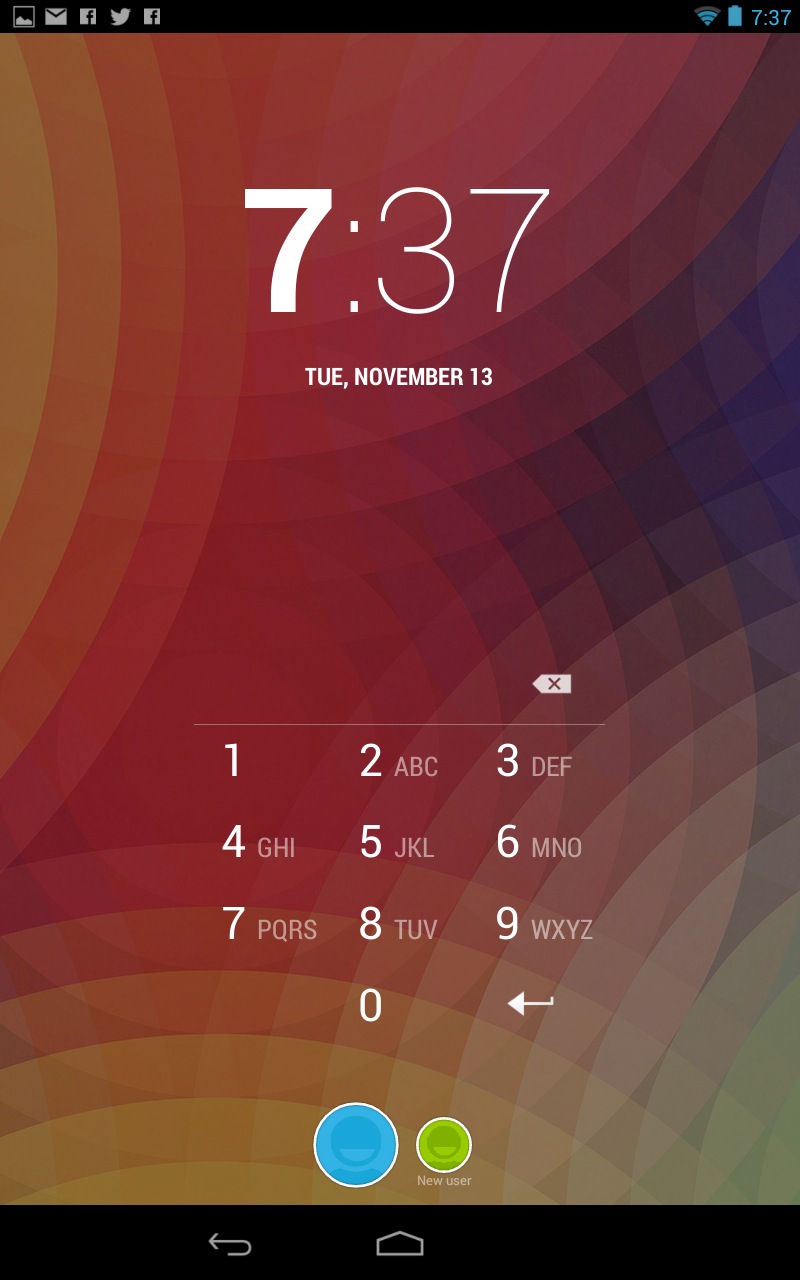
Users can be created and deleted from the Users area in your tablet's settings. The first person to use the tablet is designated as the tablet owner and can add and delete other accounts at will; network settings and app permissions are universal and shared among all users on the tablet, but all other settings—including wallpapers, home screen and lock screen layouts, PINs, screen brightness, and individual app settings, among others—are unique to each user.

Enlarge / Switching accounts is done by tapping the round buttons at the bottom of the lock screen.

The new user setup process is more or less identical to the first-time setup routine that you go through when you unbox the tablet: you associate your Google account with the tablet, determine what location settings are enabled, enter your name, and you're ready to go. A brand-new user account with no e-mails, apps, or other configured settings takes up just 12.78MB on our Nexus 7 tablet, though this will quickly increase as other users start to download stuff. Other users' background services also take up a small amount of RAM—though your mileage may vary, we observed usage between 20 and 60 megabytes on our Nexus 7—a fraction of the 1GB or 2GB of RAM in most shipping Android tablets today.

Read 9 remaining paragraphs | Comments


via Ars Technica http://arstechnica.com

Video Editing Supercomputer: Z820 RED Edition

http://blogs.windows.com/windows/b/extremewindows/archive/2012/11/13/video-editing-supercomputer-z820-red-edition.aspx

When it comes to video production PCs, I have built them and I have bought them. The new HP Z820 RED Edition is an off the shelf tricked out and tuned PC designed for performance and stability for RED Digital shooters and editors. In this post, I’ll share some information about this special HP PC, and walk you through the optimized workflow that it enables with RED 4K and 5K footage. For background, you can read up on other posts in this series here: intro post, and post production post.

Z820 RED Edition 1 Crop 600
The loaner Pre-production Z820 RED Edition PC used by the author

The Z820 RED Edition PC is built on the capable HP Z820 series platform, so it comes standard with the same features that you get with any Z820 PC:

  • 16-core Dual Zeon processors
  • Up to 512 GB RAM
  • Tool-less design
  • NVIDIA Quadro graphics
  • USB 3.0 ports
  • Large capacity drive bay configurations: 5 x 3.5 HDD’s, or 8 x 2.5 HDD’s, or 4 x 3.5 HDD’s and 4 x 2.5 HDD’s at the same time

In addition to these Z820 capabilities, the Z820 RED Edition is equipped with several custom options and configurations including:

  • All black finish
  • Custom red power button and HDD LED
  • Built-in front panel mounted REDMAG readers (one combo Blu-ray/REDMAG reader, one stand-alone REDMAG reader)
  • RED ROCKET card(s) pre-installed
  • Optimized Windows installation, Adobe CS6 apps preinstalled

If you are familiar with RED Digital Cinema equipment, you’ve probably noticed the consistent industrial design that’s a signature of RED products. Strong lines, purposeful shapes, and red accents are present on all of their products. The RED EPIC camera brain is a great example of this form-follows-function design principle:

RED EPIC brain box crop 600
The RED EPIC Brain – Typical of the RED design philosophy

The Z820 RED Edition has been customized to visually fit in nicely with the RED family of products. The power button and LEDs are all red in color. The case is black and matches the overall look of a RED camera. There’s a lot of attention to detail both inside and outside.

While you could build your own high-spec video editing system for RED footage (and many do), it’s nice to know that you don’t have to. Some of the compelling advantages of the Z820 RED Edition include turn-key convenience, tested and optimized stability, and the well-integrated/clean hardware package. Instead of needing multiple RED STATION readers sitting on top of the PC with cables and power supplies to worry about, you can just plug REDMAG SSD drives right into the built-in REDMAG readers.

In addition to being a great video editing station, the Z820 RED edition also makes a great station for things like live projection/screening of 4K/5K footage. You can take a REDMAG SSD directly out of a RED camera, and plug it into the Z820 RED Edition. It’s then an easy task to access/play/tweak footage directly from the SSD, without needing to first copy files locally. Since the built-in REDMAG readers are connected via SATA, it’s like accessing a built-in SSD- but with the convenience of external connectivity.

The files that are recorded by RED cameras use a format called REDCODE RAW. This raw video format is what enables amazing capabilities in post-production (like drastic exposure correction and color correction) and even enables cinematographers to shoot in challenging lighting conditions that would not normally be possible. But these REDCODE RAW files are not directly playable on most devices without first being transcoded into one of the popular viewable formats (like H.264 or WMV). Transcoding is a normal part of post-production, but in many cases you need to see footage before it’s rendered out as a production file. This is where the RED ROCKET card comes in handy.

RED ROCKET 1 600
The RED ROCKET 4K/5K transcoding card – included with the Z820 RED Edition

Windows offers an advantage in this context because you can stack an arbitrary number of RED ROCKET cards (based on how many PCI slots are available) which is not possible on other platforms. Since it takes a dedicated RED ROCKET card per layer of 4K/5K video being transcoded or decoded, that means that Windows offers the most powerful capability for viewing and editing multiple layers of 4K/5K footage on this kind of workstation.

I’ve been using the Z820 RED Edition for a while now for various tasks, and I’ve been really impressed by its capabilities (the RED ROCKET is awesome!). It’s also been very handy to have the built-in REDMAG readers and Blu-ray player. If you deal with RED cameras and/or REDCODE RAW footage, you should definitely check out the Z820 RED Edition!

This specialty PC isn’t available directly from HP, rather it is available from two suppliers that specialize in media production equipment and software:

· ProMax Z820 RED Edition

· Tekserve Z820 RED Edition

You can follow me on Twitter here: @GavinGear


via The Windows Blog http://blogs.windows.com/b/

Google Fiber installations begin, come with a larger TV channel choice in the bargain (video)

http://www.engadget.com/2012/11/13/google-fiber-installations-begin-come-with-more-tv-channels/

Google Fiber installations begin, come with more TV channels in the bargain video

A lot of readers in the two Kansas Cities are about to see the above sign taped to their door, and they'll be forgiven if it triggers an irrational level of excitement: it's the confirmation that Google Fiber deployments are at last underway. Starting this week in the Hanover Heights district of Kansas state's city, Google is extending fiber drops to the homes of early adopters and arranging for in-home appointments to set up whatever internet and IPTV selections they've made. The fiber team is also widening its pick of TV channels as a last-minute incentive, offering a slew of Fox sports and movie channels as well as Fuel TV, FX, National Geographic and Speed, among others. While we don't know how long it will take before the first wave of 1Gbps deployments are wrapped up, it should finally be safe to add "internet service provider" to Google's increasingly lengthy resume.

Continue reading Google Fiber installations begin, come with a larger TV channel choice in the bargain (video)

Filed under: , , , ,

Google Fiber installations begin, come with a larger TV channel choice in the bargain (video) originally appeared on Engadget on Tue, 13 Nov 2012 14:14:00 EDT. Please see our terms for use of feeds.

Permalink   |  sourceGoogle Fiber (1), (2)  | Email this | Comments

via Engadget http://www.engadget.com

Wednesday, November 28, 2012

Engadget Giveaway: win one of two ioSafe SOLO G3 rugged external hard drives!

http://www.engadget.com/2012/11/13/engadget-giveaway-iosafe/

Engadget Giveaway win one of two ioSafe SOLO G3 rugged external hard drives!

External hard drives are handy, but there's always a concern that something may happen to it that would cause all of your docs, movies, precious memories and other files to all go poof in an instant. ioSafe's certainly made a name for itself in these kinds of situations, crafting a lineup of products that offer an ever safer shelter for your important digital mementos -- and it's offering up a 3TB SOLO G3 hard drive to two lucky winners! Enter by leaving a comment below, but don't forget to make a pit stop at the company's site (linked above) and check out its offerings.

Continue reading Engadget Giveaway: win one of two ioSafe SOLO G3 rugged external hard drives!

Filed under: , ,

Engadget Giveaway: win one of two ioSafe SOLO G3 rugged external hard drives! originally appeared on Engadget on Tue, 13 Nov 2012 11:00:00 EDT. Please see our terms for use of feeds.

Permalink   |   | Email this | Comments

via Engadget http://www.engadget.com

Fitbit One tracker now ready to wake you up, count your calories all day for $100

http://www.engadget.com/2012/11/13/fitbit-one-tracker-now-on-sale/

Fitbit One tracker now on sale for $100,

If you've been biding your time for a FitBit One all-day fitness tracker, you can stop counting the days and start counting calories -- it's now in stores for $100. The newly minted replacement for the FitBit Ultra brings a vibrating alarm, along with a spiffier splashproof design, black or burgundy colors, and a brighter clock / motivational message display. You'll also get Bluetooth 4.0 connectivity with the Fitbit mobile app on laptops and handheld devices that support the wireless option, letting you see all your stats or taunt rivals on Facebook. If you're raring to go, grab it at the source below or check the PR for more details.

Continue reading Fitbit One tracker now ready to wake you up, count your calories all day for $100

Filed under:

Fitbit One tracker now ready to wake you up, count your calories all day for $100 originally appeared on Engadget on Tue, 13 Nov 2012 09:00:00 EDT. Please see our terms for use of feeds.

Permalink   |  sourceFitbit  | Email this | Comments

via Engadget http://www.engadget.com

GoPro app reaches Android, captures reckless Nexus adventures

http://www.engadget.com/2012/11/13/gopro-app-reaches-android-captures-reckless-nexus-adventures/

GoPro app reaches Android, captures reckless Nexus adventures

GoPro left its Android-using audience hanging (from a paraglider) when it posted an iOS app for remote controlling its cameras, but the group won't have been in suspense for long. The action video camera maker has posted a Google-native version that covers roughly the same feature spread as its Apple-oriented counterpart, including remote control, video previewing and daily highlight clips. Any aspiring movie makers will have to fit a narrow set of criteria to start shooting, however -- on top of an HD Hero 2 and a WiFi BacPac, Android 4.0 is a minimum requirement to start shooting without hiccups. Hero 3 support won't be coming until later this month. Despite the limitations, it's nice to know that we won't need an elaborate Google Glass setup to record our next skydive in a Mountain View-approved fashion.

Filed under: , ,

GoPro app reaches Android, captures reckless Nexus adventures originally appeared on Engadget on Tue, 13 Nov 2012 08:14:00 EDT. Please see our terms for use of feeds.

Permalink GoPro (Twitter)  |  sourceGoogle Play  | Email this | Comments

via Engadget http://www.engadget.com

Vizio Co-Star update brings enhanced Google Play experience, boosts performance

http://www.engadget.com/2012/11/12/vizio-co-star-update/

DNP Vizio Costar update lets you get Google Play content, sync purchases

Vizio has released an update that adds enhanced Google Play features and a performance boost to the affordable and adorable Vizio Co-Star. Owners of the tiny Google TV box can now buy or rent directly from the Google Play Store and sync purchases made on other devices. There's also a handy new search feature that scours the Google Play store, live TV and video apps like Netflix and Amazon to make sure you never miss an episode of your favorite TV show. In addition, the update promises faster menus and navigation, enhanced HDMI stability and improved Netflix performance. Looks like $99 buys quite a nice little Google TV box, as long as you can live with that awkward remote, right?

Filed under: ,

Vizio Co-Star update brings enhanced Google Play experience, boosts performance originally appeared on Engadget on Mon, 12 Nov 2012 23:11:00 EDT. Please see our terms for use of feeds.

Permalink   |  sourceVizio  | Email this | Comments

via Engadget http://www.engadget.com

Engadget's holiday gift guide 2012

http://www.engadget.com/holidaygiftguide2012/

Engadget's holiday gift guide 2012

Welcome to Engadget's holiday gift guide for 2012! You've heard a thousand times how stressful this season is -- and we're not gonna lie, tech gift-giving is no cinch this year. With the recent arrival of Windows 8, there are a myriad of laptops, tablets and hybrids to choose from, and you're not getting off easy when it comes to other devices, either. A year's worth of stellar new smartphones, 4K TVs, gaming consoles and everything in between are ready to compete for your hard-earned dough. Sound daunting enough? Well, never fear, because we're here to guide you through the gadget storm with our curated collection of top products. And we want to reward you for doing your research: in partnership with AT&T, we'll be giving away one smartphone for each guide. (Look for instructions in each new post.) For now, click on over to our available category pages, and stay tuned for those to come -- identified by a faded link for now.

Engadget's holiday gift guide 2012 Engadget's holiday gift guide 2012 Engadget's holiday gift guide 2012 Engadget's holiday gift guide 2012
Accessories
Bags and Cases
Camcorders
Cameras
. . . .
Engadget's holiday gift guide 2012 Engadget's holiday gift guide 2012 Engadget's holiday gift guide 2012 Engadget's holiday gift guide 2012
Docks
E-readers
Fun Stuff!
Gaming
. . . .
Engadget's holiday gift guide 2012 DNP Engadget's back to school guide 2012 Engadget's holiday gift guide 2012
HDTV
Laptops
Portable Audio
Smartphones
. . . .
Engadget's holiday gift guide 2012 Engadget's holiday gift guide 2012
Tablets
Ultraportables

Filed under:

Engadget's holiday gift guide 2012 originally appeared on Engadget on Mon, 12 Nov 2012 13:00:00 EDT. Please see our terms for use of feeds.

Permalink   |   | Email this | Comments

via Engadget http://www.engadget.com

Livescribe Sky WiFi Smartpen review

http://www.engadget.com/2012/11/12/livescribe-sky-wifi-smartpen-review/

Livescribe Sky WiFi Smartpen review

For a relatively niche company that has only been around for five years, Livescribe has grown quickly. Its smartpens -- which cleverly digitize handwritten notes and audio -- have already attracted a million users. However, just because these customers prefer to write their notes the old-fashioned way, that doesn't mean they aren't also obsessive about technological progress. In fact, many of them have been waiting on one new feature in particular: a totally wireless workflow, which would allow them to write a note with their smartpens and then -- without any docking or syncing -- see their scribbles appear in the cloud and on their mobile devices.

Well, as you've probably guessed by now, that is precisely the gap that the new Sky pen is looking to fill. The first half of its operation is identical to that of its predecessors, the Pulse and Echo: it contains a camera and microphone, which enable the capture of handwritten notes and time-linked audio files. (You can choose between 2GB, 4GB and 8GB of built-in storage.) But what happens next is totally different. You use "buttons" printed inside Livescribe's proprietary stationery, in conjunction with the pen's OLED display, to select a local WiFi network, enter the password and sync your files directly to Evernote. The popular online note-taking platform then handles everything else, automatically filing the text and audio in the cloud using a time stamp, making it available on whatever devices run Evernote's apps or web interface. What's more, it makes the note searchable through optical character recognition (OCR) of your handwriting.

If there's a downside to users getting what they've been asking for, it's that they are the ones expected to pay for it. The Sky's base model matches the Echo's $170 launch price, but that older pen came with twice as much internal storage, and can also now be had at a discount. Moreover, the 4GB and 8GB Sky pens rise to $200 and $250, respectively, which means this is only likely to be sensible if you really, really dislike writing or typing on a screen. Even assuming that you're totally stuck in your pen-and-ink ways, could a $170 pen ever be worth it? Read on to find out.

Continue reading Livescribe Sky WiFi Smartpen review

Filed under:

Livescribe Sky WiFi Smartpen review originally appeared on Engadget on Mon, 12 Nov 2012 09:00:00 EDT. Please see our terms for use of feeds.

Permalink   |   | Email this | Comments

via Engadget http://www.engadget.com

Review: Nexus 10 tablet is a solid house built on shifting sands

http://arstechnica.com/gadgets/2012/11/nexus-10-tablet-is-a-solid-house-built-on-shifting-sands/

Is the Nexus 10 a 10-inch Android tablet we can believe in?
Andrew Cunningham
Specs at a glance: Google/Samsung Nexus 10
Screen 2560×1600 10.055" (300 ppi) PLS touchscreen
OS Android 4.2 "Jelly Bean"
CPU 1.7GHz Samsung Exynos 5 Dual
RAM 2GB
GPU ARM Mali-T604
Storage 16 or 32GB NAND flash
Networking 802.11a/b/g/n, Bluetooth 4.0, NFC
Ports Micro USB, Micro HDMI, headphones, docking connector
Size 10.39" x 6.99" x 0.35" (263.9 x 177.6 x 8.9 mm)
Weight 1.33 lbs (603 g)
Battery 9000 mAh
Starting price $399 ($499 for 32GB)
Price as reviewed $399
Sensor Ambient light sensor, GPS, Accelerometer, Gyroscope, Compass, Barometer
Other perks Power adapter

One of the reasons we liked the Nexus 7 so much was that it felt like a 7-inch tablet done right. Neither the form factor nor the $199 price point were new—Samsung, Amazon, Barnes & Noble, and others were all pushing 7-inch Android tablets—but the ASUS-Google joint was the first whose hardware, software, and price came together to make a convincing case for a smaller tablet.

The Google-backed, Samsung-developed Nexus 10 has no such luxury—not only is the 10-inch tablet market Apple's bread and butter, but competition from new Windows 8 and Windows RT tablets as well as other Android tablets is so stiff (and the signal-to-noise ratio is so low) that it's hard to stand out from the crowd. Further complicating matters is the fact that going all the way back to the Motorola Xoom, 10-inch Android tablets have had trouble gaining a foothold in the market, creating a dearth of tablet apps that is more noticeable on a 10-inch screen than a 7-inch screen.

The Nexus 10 is the first 10-inch tablet to bear Google's Nexus branding, and as such it has its work cut out for it: not only does it need to be a shining example of what a big Android tablet should be, it needs to convince developers and potential buyers alike that Android can offer as good an experience on a larger screen as its competitors can. Does it succeed, or is this just another 10-inch Android tablet that doesn't live up to its promise?

Read 44 remaining paragraphs | Comments


via Ars Technica http://arstechnica.com

Tuesday, November 27, 2012

Toshiba Satellite U925t review: with its first Windows 8 convertible, Toshiba bets big on the slider

http://www.engadget.com/2012/11/09/toshiba-satellite-u925t-review/

Toshiba Satellite U925t review

You can't see our New York City office right now, but it's something of a laptop menagerie. We just finished reviewing a laptop whose screen flips inside its hinge, and now we're testing an Ultrabook with a touchscreen, along with a notebook whose screen folds all the way back. The Toshiba Satellite U925t ($1,150) is yet another breed of Windows 8 hardware. It's a slider, to be exact, which is to say its 12.5-inch screen slides out and up to reveal a full-sized keyboard. It's nice, in theory, because you can use it as a tablet without having to worry about packing a separate keyboard. But unlike the Dell XPS 12 or Lenovo IdeaPad Yoga 13, which can also be used in tablet mode, the screen here is always exposed. As you can imagine, too, that propped-up display has a very real effect on the typing experience. Given all that, is there any reason to consider this over other, similarly priced Windows 8 convertibles? Could there perhaps be any performance benefits, or advantages in screen quality? Meet us after the break where we'll hash it out.

Continue reading Toshiba Satellite U925t review: with its first Windows 8 convertible, Toshiba bets big on the slider

Filed under:

Toshiba Satellite U925t review: with its first Windows 8 convertible, Toshiba bets big on the slider originally appeared on Engadget on Fri, 09 Nov 2012 11:11:00 EDT. Please see our terms for use of feeds.

Permalink   |   | Email this | Comments

via Engadget http://www.engadget.com

Nexus 4—two-thirds of a great phone

http://arstechnica.com/gadgets/2012/11/nexus-4-two-thirds-of-a-great-phone/

Another day, another Nexus phone to add to Google's list of stock handsets not tainted by gratuitous add-ons, carrier bloatware, and OEM skins. For diehard Android users, a Nexus phone is usually the way to go when picking a handset: Nexus-branded devices are the first to get updated with every new version of Android, at least until the hardware inside the device becomes obsolete. The Nexus 4, though, is a special case. It has a near-twin in the non-Nexus LG Optimus G. This brother-from-another-mother was released not too long ago and boasts the same innards as the Nexus 4 as well as most of the same functionality. For power-hungry Android users, choosing between the two is a question of whether they should adopt the Nexus 4 for its Googlefication or stick with its counterpart for LG's value-added features.

Fear not, readers, because this review will arm you with the insight you need to make that decision. Though we'll make many comparisons between the two handsets (there are actually three handsets—Sprint has its own version of the LG Optimus G, though we haven't yet been able to lay hands on it), this is essentially a breakdown of the Nexus 4's future as a contender in the upcoming 2013 smartphone wars. We won't be touching too much on Android 4.2, so check out our full review for more information about the operating system that runs on the Nexus 4.

Body and build

Your Nexus 4, ladies and gentlemen.

LG's Nexus 4 incorporates the standard "ready for business" aesthetic sported by previous Nexus phones and made popular by Samsung. Its all-black chassis closely resembles the Galaxy Nexus and its rounded corners are a throwback to the Nexus S. The handset also utilizes some of the same design elements featured in its sibling, the Optimus G. The device gives the impression that LG took the parts that made it proud about the Optimus G and shaped them to fit Google's vision.

Read 31 remaining paragraphs | Comments


via Ars Technica http://arstechnica.com

Advanced ticket sales for The Hobbit start, 450 theaters are ready for 48 fps 3D

http://www.engadget.com/2012/11/07/the-hobbit-an-unexpected-journey-ticket-sales-48fps/

Advanced ticket sales for the The Hobbit available today with 450 theaters ready for 48 fps

Even if you aren't a Peter Jackson fan, you might still be interesting in seeing what all the fuss is about regarding the latest theater technology, 48 fps. It shouldn't be too hard either, because while the high frame version of The Hobbit: An Unexpected Journey is a limited release, the 450~ locations planned (out of approximately 4000 theaters showing the flick) cover just about every major and mid-sized city in the US. Regal and AMC theaters might be your best bet as they lead the pack in LA, with 19 theaters there ready for the new technology. Advanced ticket sales are already available for the December 14th release, but you'll want to look for 'HFR' or the words High Frame Rate before check out, if you want to see it the way Peter Jackson intended. If things go well, you can expect a much wider release of the 48 fps version of the sequel, which is already set to hit theaters in December 2013.

Continue reading Advanced ticket sales for The Hobbit start, 450 theaters are ready for 48 fps 3D

Filed under: ,

Advanced ticket sales for The Hobbit start, 450 theaters are ready for 48 fps 3D originally appeared on Engadget on Wed, 07 Nov 2012 23:43:00 EDT. Please see our terms for use of feeds.

Permalink   |  sourceLA Times, The Hobbit.com  | Email this | Comments

via Engadget http://www.engadget.com

Samsung Chromebook review (2012)

http://www.engadget.com/2012/11/07/samsung-chromebook-review-2012/

Samsung Chromebook review 2012

Whenever we review Chromebooks, we always come to more or less the same conclusion: it's a neat idea, a computer where everything is done online, but it's not worth the money. That was back when Chrome OS devices were priced at $500, competing with netbooks that could run not just the Chrome browser, but all manner of Windows apps. Ditto for tablets, which can be tricked out with many thousands of apps on both iOS and Android.

But what if we told you the price had been slashed to $249? Then could you see yourself pulling the trigger? That's the gamble Google and Samsung are taking with the new Chromebook, which retails for $249 with an 11.6-inch display, 6.5-hour battery and a more compact design. All told, it's as good a piece of hardware as any netbook you'll find, only cheaper. And good luck finding a tablet-and-keyboard combo for less than $250.

There is one major change this time around, though, and that's the Chromebook's dual-core ARM processor, instead of something from Intel's Celeron family. The performance isn't likely to be as good, but will that matter if all you're running is the Chrome browser? Will the lowered price be enough to lure in parents, travelers and other folks looking for a cheap second laptop? Let's see.

Continue reading Samsung Chromebook review (2012)

Filed under: , ,

Samsung Chromebook review (2012) originally appeared on Engadget on Wed, 07 Nov 2012 09:00:00 EDT. Please see our terms for use of feeds.

Permalink   |   | Email this | Comments

via Engadget http://www.engadget.com