Wednesday, November 28, 2012

Review: Nexus 10 tablet is a solid house built on shifting sands

http://arstechnica.com/gadgets/2012/11/nexus-10-tablet-is-a-solid-house-built-on-shifting-sands/

Is the Nexus 10 a 10-inch Android tablet we can believe in?
Andrew Cunningham
Specs at a glance: Google/Samsung Nexus 10
Screen 2560×1600 10.055" (300 ppi) PLS touchscreen
OS Android 4.2 "Jelly Bean"
CPU 1.7GHz Samsung Exynos 5 Dual
RAM 2GB
GPU ARM Mali-T604
Storage 16 or 32GB NAND flash
Networking 802.11a/b/g/n, Bluetooth 4.0, NFC
Ports Micro USB, Micro HDMI, headphones, docking connector
Size 10.39" x 6.99" x 0.35" (263.9 x 177.6 x 8.9 mm)
Weight 1.33 lbs (603 g)
Battery 9000 mAh
Starting price $399 ($499 for 32GB)
Price as reviewed $399
Sensor Ambient light sensor, GPS, Accelerometer, Gyroscope, Compass, Barometer
Other perks Power adapter

One of the reasons we liked the Nexus 7 so much was that it felt like a 7-inch tablet done right. Neither the form factor nor the $199 price point were new—Samsung, Amazon, Barnes & Noble, and others were all pushing 7-inch Android tablets—but the ASUS-Google joint was the first whose hardware, software, and price came together to make a convincing case for a smaller tablet.

The Google-backed, Samsung-developed Nexus 10 has no such luxury—not only is the 10-inch tablet market Apple's bread and butter, but competition from new Windows 8 and Windows RT tablets as well as other Android tablets is so stiff (and the signal-to-noise ratio is so low) that it's hard to stand out from the crowd. Further complicating matters is the fact that going all the way back to the Motorola Xoom, 10-inch Android tablets have had trouble gaining a foothold in the market, creating a dearth of tablet apps that is more noticeable on a 10-inch screen than a 7-inch screen.

The Nexus 10 is the first 10-inch tablet to bear Google's Nexus branding, and as such it has its work cut out for it: not only does it need to be a shining example of what a big Android tablet should be, it needs to convince developers and potential buyers alike that Android can offer as good an experience on a larger screen as its competitors can. Does it succeed, or is this just another 10-inch Android tablet that doesn't live up to its promise?

Read 44 remaining paragraphs | Comments


via Ars Technica http://arstechnica.com

Tuesday, November 27, 2012

Toshiba Satellite U925t review: with its first Windows 8 convertible, Toshiba bets big on the slider

http://www.engadget.com/2012/11/09/toshiba-satellite-u925t-review/

Toshiba Satellite U925t review

You can't see our New York City office right now, but it's something of a laptop menagerie. We just finished reviewing a laptop whose screen flips inside its hinge, and now we're testing an Ultrabook with a touchscreen, along with a notebook whose screen folds all the way back. The Toshiba Satellite U925t ($1,150) is yet another breed of Windows 8 hardware. It's a slider, to be exact, which is to say its 12.5-inch screen slides out and up to reveal a full-sized keyboard. It's nice, in theory, because you can use it as a tablet without having to worry about packing a separate keyboard. But unlike the Dell XPS 12 or Lenovo IdeaPad Yoga 13, which can also be used in tablet mode, the screen here is always exposed. As you can imagine, too, that propped-up display has a very real effect on the typing experience. Given all that, is there any reason to consider this over other, similarly priced Windows 8 convertibles? Could there perhaps be any performance benefits, or advantages in screen quality? Meet us after the break where we'll hash it out.

Continue reading Toshiba Satellite U925t review: with its first Windows 8 convertible, Toshiba bets big on the slider

Filed under:

Toshiba Satellite U925t review: with its first Windows 8 convertible, Toshiba bets big on the slider originally appeared on Engadget on Fri, 09 Nov 2012 11:11:00 EDT. Please see our terms for use of feeds.

Permalink   |   | Email this | Comments

via Engadget http://www.engadget.com

Nexus 4—two-thirds of a great phone

http://arstechnica.com/gadgets/2012/11/nexus-4-two-thirds-of-a-great-phone/

Another day, another Nexus phone to add to Google's list of stock handsets not tainted by gratuitous add-ons, carrier bloatware, and OEM skins. For diehard Android users, a Nexus phone is usually the way to go when picking a handset: Nexus-branded devices are the first to get updated with every new version of Android, at least until the hardware inside the device becomes obsolete. The Nexus 4, though, is a special case. It has a near-twin in the non-Nexus LG Optimus G. This brother-from-another-mother was released not too long ago and boasts the same innards as the Nexus 4 as well as most of the same functionality. For power-hungry Android users, choosing between the two is a question of whether they should adopt the Nexus 4 for its Googlefication or stick with its counterpart for LG's value-added features.

Fear not, readers, because this review will arm you with the insight you need to make that decision. Though we'll make many comparisons between the two handsets (there are actually three handsets—Sprint has its own version of the LG Optimus G, though we haven't yet been able to lay hands on it), this is essentially a breakdown of the Nexus 4's future as a contender in the upcoming 2013 smartphone wars. We won't be touching too much on Android 4.2, so check out our full review for more information about the operating system that runs on the Nexus 4.

Body and build

Your Nexus 4, ladies and gentlemen.

LG's Nexus 4 incorporates the standard "ready for business" aesthetic sported by previous Nexus phones and made popular by Samsung. Its all-black chassis closely resembles the Galaxy Nexus and its rounded corners are a throwback to the Nexus S. The handset also utilizes some of the same design elements featured in its sibling, the Optimus G. The device gives the impression that LG took the parts that made it proud about the Optimus G and shaped them to fit Google's vision.

Read 31 remaining paragraphs | Comments


via Ars Technica http://arstechnica.com

Advanced ticket sales for The Hobbit start, 450 theaters are ready for 48 fps 3D

http://www.engadget.com/2012/11/07/the-hobbit-an-unexpected-journey-ticket-sales-48fps/

Advanced ticket sales for the The Hobbit available today with 450 theaters ready for 48 fps

Even if you aren't a Peter Jackson fan, you might still be interesting in seeing what all the fuss is about regarding the latest theater technology, 48 fps. It shouldn't be too hard either, because while the high frame version of The Hobbit: An Unexpected Journey is a limited release, the 450~ locations planned (out of approximately 4000 theaters showing the flick) cover just about every major and mid-sized city in the US. Regal and AMC theaters might be your best bet as they lead the pack in LA, with 19 theaters there ready for the new technology. Advanced ticket sales are already available for the December 14th release, but you'll want to look for 'HFR' or the words High Frame Rate before check out, if you want to see it the way Peter Jackson intended. If things go well, you can expect a much wider release of the 48 fps version of the sequel, which is already set to hit theaters in December 2013.

Continue reading Advanced ticket sales for The Hobbit start, 450 theaters are ready for 48 fps 3D

Filed under: ,

Advanced ticket sales for The Hobbit start, 450 theaters are ready for 48 fps 3D originally appeared on Engadget on Wed, 07 Nov 2012 23:43:00 EDT. Please see our terms for use of feeds.

Permalink   |  sourceLA Times, The Hobbit.com  | Email this | Comments

via Engadget http://www.engadget.com

Samsung Chromebook review (2012)

http://www.engadget.com/2012/11/07/samsung-chromebook-review-2012/

Samsung Chromebook review 2012

Whenever we review Chromebooks, we always come to more or less the same conclusion: it's a neat idea, a computer where everything is done online, but it's not worth the money. That was back when Chrome OS devices were priced at $500, competing with netbooks that could run not just the Chrome browser, but all manner of Windows apps. Ditto for tablets, which can be tricked out with many thousands of apps on both iOS and Android.

But what if we told you the price had been slashed to $249? Then could you see yourself pulling the trigger? That's the gamble Google and Samsung are taking with the new Chromebook, which retails for $249 with an 11.6-inch display, 6.5-hour battery and a more compact design. All told, it's as good a piece of hardware as any netbook you'll find, only cheaper. And good luck finding a tablet-and-keyboard combo for less than $250.

There is one major change this time around, though, and that's the Chromebook's dual-core ARM processor, instead of something from Intel's Celeron family. The performance isn't likely to be as good, but will that matter if all you're running is the Chrome browser? Will the lowered price be enough to lure in parents, travelers and other folks looking for a cheap second laptop? Let's see.

Continue reading Samsung Chromebook review (2012)

Filed under: , ,

Samsung Chromebook review (2012) originally appeared on Engadget on Wed, 07 Nov 2012 09:00:00 EDT. Please see our terms for use of feeds.

Permalink   |   | Email this | Comments

via Engadget http://www.engadget.com

Review: iPad 4 has processing power to spare

http://arstechnica.com/apple/2012/11/review-ipad-4-has-processing-power-to-spare/

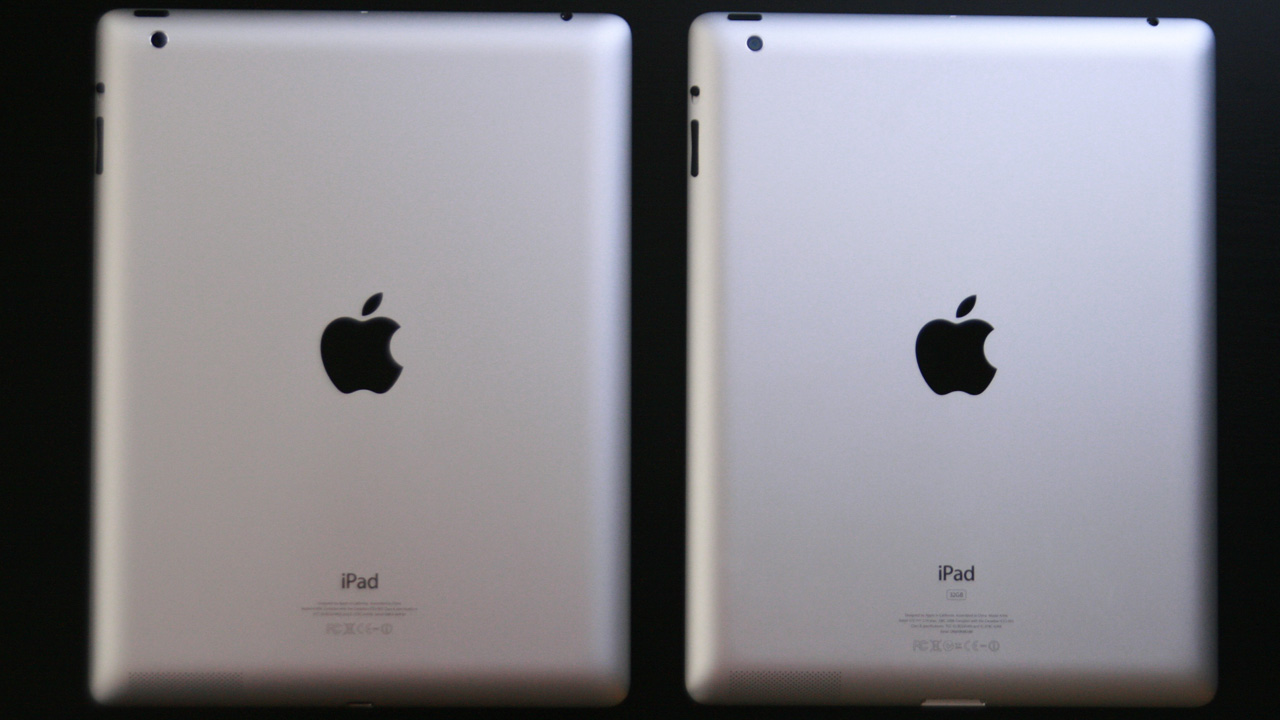
The new, fourth-generation iPad looks just like the previous generation.
Chris Foresman

Apple surprised us by announcing it was launching a fourth-generation iPad just seven months after it rolled out the Retina display-equipped third-generation iPad in March. Though externally it remains almost identical to the third-gen iPad—save its new Lightning connector, which replaces the 30-pin Dock connector—internally Apple has revved up its processor. The company claims the iPad 4 packs both double the computing performance and double the graphics performance over the previous model.

We spent the weekend with an iPad 4 and iPad 3 in the Orbiting HQ, benchmarking the new processor and spending time in various apps to see if Apple's performance claims held up. Overall, it seems as though we can take Apple at their word. But depending on the apps you use, you may not notice a tons of improvement until developers learn to better exploit the A6X processor's power.

This iPad looks very familiar

Enlarge / Look closely—can you tell which iPad is which?
Chris Foresman
Specs at a glance: Apple iPad (4th-gen)
Screen 2048×1536 9.7" (264 ppi), "Retina" touchscreen
OS iOS 6
CPU 1.4-1.7GHz Apple A6X
RAM 1GB DDR3
GPU ImageTech SGX554MP4
Storage 16, 32, or 64GB NAND flash
Networking 802.11a/b/g/n, Bluetooth 4.0
Ports Lightning connector
Size 9.50×7.31×0.37" (241.2×185.7×9.4 mm)
Weight 1.44 lbs (652 g)
Battery 43 Whr
Starting price $499
Price as reviewed $599
Sensor Ambient light sensor, Accelerometer, Gyroscope, Magnetometer
Other perks 12W charger

Again, the iPad 4 is, from the outside, nearly identical to the last-generation iPad before it. It shares a similar aluminum unibody shell, with a flat bottom and sloping edges; the headphone jack, buttons, volume rocker all appear identical; even the 5MP autofocus camera at the rear is the same. There's not really much new to say about the design, except that Apple has swapped out the aging 30-pin Dock connector for its new Lightning connector, which is being phased in as the standard connector for all its mobile devices.

Read 37 remaining paragraphs | Comments


via Ars Technica http://arstechnica.com

Withings WS-30 anti-slouch connected weighing scales arrive in the US for $130

http://www.engadget.com/2012/11/05/withings-ws-30-us-launch/

Withings WS30 antislouch connected weighing scales arrive in the US for $130

Waking up to be greeted by a weighing scale that tells you to stand up straight and buck up your ideas might not be everyone's ideal morning, but we do love Withings' gear. The company's latest, the WS-30, has meandered over from Europe and is now available to order from today in the US of A. It'll set you back $130, but that's a small price to pay if you're planning to make a few positive life changes before the winter forces you to stay inside.

Continue reading Withings WS-30 anti-slouch connected weighing scales arrive in the US for $130

Filed under: ,

Withings WS-30 anti-slouch connected weighing scales arrive in the US for $130 originally appeared on Engadget on Mon, 05 Nov 2012 18:47:00 EDT. Please see our terms for use of feeds.

Permalink   |   | Email this | Comments

via Engadget http://www.engadget.com

Simple.TV review: a set-top box that streams broadcast TV to mobile devices

http://www.engadget.com/2012/11/03/simple-tv-review/

SimpleTV review

Anyone who follows the home entertainment space closely probably agrees that TV is broken: archaic user interfaces, pricey bundles, six remotes that each do one thing, all limited to the confines of your home. Of course, realizing it's broken and knowing how to fix it are two different things. One attempt at a fix is Simple.TV. This $149 box (plus $59 a year for service) bridges the gap between the various devices you already own and the world of broadcast television. It allows you to access the plethora of content available via unencrypted digital cable, or for free via an antenna, on just about any device you own -- tablet, smartphone, PC or even a TV. Sounds pretty great, huh? But does it deliver? And can it replace your cable box and the high-priced service that goes with it? Just click on through, and you'll find out.

Gallery: Simple.TV review

Continue reading Simple.TV review: a set-top box that streams broadcast TV to mobile devices

Filed under: ,

Simple.TV review: a set-top box that streams broadcast TV to mobile devices originally appeared on Engadget on Sat, 03 Nov 2012 11:38:00 EDT. Please see our terms for use of feeds.

Permalink   |   | Email this | Comments

via Engadget http://www.engadget.com

Windows 8 basics: Tips, tricks, and cures

http://arstechnica.com/information-technology/2012/11/windows-8-basics-tips-tricks-and-cures/

Love it or hate it, Windows 8 is a major departure from Microsoft's past interfaces. While previous versions of Windows kept mostly the same mouse-driven metaphor as their predecessors, even veteran Windows users may find the start of their Windows 8 experience a little disorienting.

For the average PC user, some of the changes may turn once routine tasks into frustrating excursions involving Windows 8's manifold gestures, especially if that average PC user is trying to use Windows 8 with a mouse. On the other hand, experiencing Windows 8 on a touch-capable device is somewhat more intuitive—but some basic aspects of the OS will still mystify many.

Don't panic. Here are the essential things you need to know to climb Windows 8's learning curve quickly—and, if you are so inclined, to make Windows 8 look a little more like that old Windows you knew so well. Once you've gotten past the distractions of the shiny animated Start page, you'll be productive in no time. And you can even make that Start screen go away if you want.

Read 45 remaining paragraphs | Comments


via Ars Technica http://arstechnica.com

Need for speed: Just how fast is Google's new Nexus 4?

http://arstechnica.com/gadgets/2012/10/need-for-speed-just-how-fast-is-googles-new-nexus-4/

The Nexus 4 certainly won't want for speed.

Despite the inclement weather, Google was still able to announce the new LG-made Nexus 4 handset yesterday, and like the Optimus G on which it is based, this new phone should be quite speedy. Both phones use a 1.5GHz quad-core version of Qualcomm's Snapdragon S4 Pro (part number APQ8064) paired with an Adreno 320 GPU. To put that in context, the dual-core versions of the S4 routinely match or beat the quad-core Tegra 3 and Exynos 4 from NVIDIA and Samsung, respectively, so the quad-core version of the chip should be a real monster.

To explore just how fast the new Nexus phone will be, I asked our own Florence Ion to send me the benchmark results from the LG Optimus G she's currently reviewing. While there will be some subtle differences between the performance of the two phones—the Nexus is running Android 4.2, for example, while the Optimus G is still stuck on 4.0.4 for the time being—looking at how its non-Nexus cousin runs is going to tell us a lot about the latest Google-branded phone and whether it can stand up to the competition on both the iOS and Android sides of the fence.

Let's dive right into the benchmarks to see just what kind of performance these phones will be able to deliver.

Read 5 remaining paragraphs | Comments


via Ars Technica http://arstechnica.com

Better on the inside: under the hood of Windows 8

http://arstechnica.com/information-technology/2012/10/better-on-the-inside-under-the-hood-of-windows-8/

Windows 8's most obvious—and most divisive—new feature is its user interface. However, it would be a mistake to think that the user interface is the only thing that's new in Windows 8: there's a lot that's changed behind the scenes, too.

Just as is the case with the user interface, many of the improvements made to the Windows 8 core are motivated by Microsoft's desire to transform Windows into an effective tablet operating system. Even those of us with no interest at all in tablets can stand to take advantage of these changes, however. For example, Windows 8 is more power efficient and uses less memory than Windows 7; while such work is critical to getting the software to run well on low-memory tablets with all-day battery life, it's equally advantageous for laptop users.

The biggest single piece of technology that is new to Windows 8 is, however, squarely Metro focused: it's a large set of libraries and components called WinRT. I've already written extensively about what WinRT is, so I won't be getting into that here, but there are system capabilities that WinRT apps can use (or are forced to use) that are interesting in their own right.

Read 77 remaining paragraphs | Comments


via Ars Technica http://arstechnica.com

Music and Video in Windows 8: a work in progress

http://arstechnica.com/features/2012/10/a-work-in-progress-the-windows-8-multimedia-experience/

We've been following the core media apps—Music and Video—since the Windows 8 Consumer Preview. That development hinted Microsoft wanted to become a viable competitor to Apple and Amazon in the multimedia content realm. We found the first glimpse compelling, a signal that perhaps there was a true stake for Redmond to claim.

Now with Windows 8 live, the Preview groundwork has been built upon. As you'll see here, things have changed, but not always as expected. The evolution of Music and Video begins up front, where the apps have shed their Zune branding. Instead, Microsoft chose to reuse the Xbox brand, as the company moves to expand the scope of the Xbox name from gaming to all media and entertainment.

First (visual) impressions

The Music and Video applications are close siblings. Aside from the obvious difference implied by their names, their structure and organization are essentially identical.

Read 40 remaining paragraphs | Comments


via Ars Technica http://arstechnica.com

Nexus 10 review

http://www.engadget.com/2012/11/02/nexus-10-review/

DNP Nexus 10 review

When Google unleashed the Nexus 7 upon us earlier this summer we were caught completely off-guard. A $200 tablet that was legitimately good in every regard? It was unheard of at the time, and even five months later it's still a really nice slate. Now it has a big brother, the Nexus 10, this time coming courtesy of Samsung. At $399 it arrives with less fanfare and a higher price, but it also comes with a very distinctive selling point: a stratospherically high resolution.

This 10.1-inch panel has an eye-watering 2,560 x 1,600 resolution -- the very same as the 13-inch MacBook Pro with Retina display but in a much smaller package. Is Google's second reference tablet the ultimate Android 10-incher at a bargain price, or is it simply another big tablet with a lot of pixels? Your answer awaits after the break.

Gallery: Nexus 10 review

Continue reading Nexus 10 review

Filed under: , ,

Nexus 10 review originally appeared on Engadget on Fri, 02 Nov 2012 11:00:00 EDT. Please see our terms for use of feeds.

Permalink   |   | Email this | Comments

via Engadget http://www.engadget.com

Nexus 4 review

http://www.engadget.com/2012/11/02/nexus-4-review/

Nexus 4 review

Movie sequels often don't live up to the hype of the original blockbuster, but the same isn't always true of smartphones -- on the contrary, they typically get even better. The Nexus lineup, initially thought of as a "playground" for Android developers to test their apps on, has continually gotten better at its craft (and popularity). Not only that, it's picking up momentum: in less than five months, Google has crafted two Nexus tablets as well as its latest and greatest smartphone known as the Nexus 4, and the attractively priced devices are now facing more interest than they ever have before.

The Nexus 4 is a veritable dreamboat when it comes to looks and specs. It's a smooth, elegant-looking device that comes with a large, 4.7-inch, HD display, a 1.5GHz quad-core Snapdragon S4 Pro processor and plenty of other appealing components. It exhibits a lot of commonalities to LG's current flagship, the Optimus G. And for a starting price of $299 unlocked, it's sure to attract a whole new demographic that until recently had never even heard of a Nexus. But is this a flagship smartphone that everyone will want to buy, or should the fourth-generation offering just be another target of developers' envy? Stay tuned past the break to find out.

Continue reading Nexus 4 review

Filed under: , , , ,

Nexus 4 review originally appeared on Engadget on Fri, 02 Nov 2012 11:00:00 EDT. Please see our terms for use of feeds.

Permalink   |   | Email this | Comments

via Engadget http://www.engadget.com

Google Wallet update purportedly leaks plans for a real-world card, transfers and transit passes

http://www.engadget.com/2012/11/01/google-wallet-update-purportedly-leaks-plans-for-real-world-card/

Google Wallet update purportedly leaks plans for a realworld card, transit passes and transfers

Google Wallet hasn't had much uptake in the real world. When most of its use has revolved around one carrier, few payment points and even fewer phones, most of us have had to sit on the sidelines. If an Android Police source really did come across a leaked future build of Google Wallet as he claims, though, we may know how Google surmounts that problem: going old school with a real-world card. Screenshots in the app supposedly show a mail-in option for plastic that could completely replace credit and debit cards without turning to NFC. Any charges after a typical swipe of the magnetic strip would simply go to whatever payment source is set as Wallet's default, letting minimalists slim down their actual wallets while sharing in the same discounts as their phone-wielding counterparts. Digital-only purists would still get something out of the deal, as the update could also bring person-to-person money transfers and support for mass transit cards. How soon the as yet unconfirmed app would appear is still a mystery, but it dovetails with Google teasing a Wallet revamp that's rumored to take mobile use beyond its Android-only roots; we just didn't anticipate that the company might bypass our phones altogether.

Filed under: , , ,

Google Wallet update purportedly leaks plans for a real-world card, transfers and transit passes originally appeared on Engadget on Thu, 01 Nov 2012 16:54:00 EDT. Please see our terms for use of feeds.

Permalink   |  sourceAndroid Police  | Email this | Comments

via Engadget http://www.engadget.com

MSI launches the 27-inch Wind Top AE2712 all-in-one brandishing Windows 8, military specs

http://www.engadget.com/2012/11/01/msi-wind-top-ae2712-all-in-one/

MSI launches the 27inch Wind Top AE2712 allinone toting Windows 8, military specs

The Windows 8 all-in-one arena is already pretty crowded, but if MSI's new model had to fight it out with the rest battle-bot style, then it might just come out on top. That's because the Wind Top AE2712 comes with MSI's usual military class components, alongside a brutish 27-inch 1080p display with ten-finger touch, Core i3 or i5 processors and optional NVIDIA GeForce GT630M graphics (on the 'G' model). Also included is the company's Smart Media cloud that lets you share data with DNLA-enabled TVs and mobile devices. The PC's already popped up on Amazon UK with a £830 sticker and November 9th ship date, so if you need an AIO tough enough to withstand, say, an all-out rugrat assault, check out the source link.

Filed under:

MSI launches the 27-inch Wind Top AE2712 all-in-one brandishing Windows 8, military specs originally appeared on Engadget on Thu, 01 Nov 2012 10:23:00 EDT. Please see our terms for use of feeds.

Permalink   |  sourceMSI  | Email this | Comments

via Engadget http://www.engadget.com

Building a Home Server with Windows 8

http://www.mswhs.com/2012/11/building-a-home-server-with-windows-8/?utm_source=feedburner&utm_medium=feed&utm_campaign=Feed%3A+MSWHS+%28MS+Windows+Home+Server%29

MaximumPC has a guide on how to use Windows 8 as a Home Server:

Saying that Windows 8 is a major shift in strategy for Microsoft is pretty obvious at this point. Between the Metro interface, complete dismissal of the start menu, focus on touch screen devices, and myriad other changes; this is not the Windows of the Bill Gates era. One change which hasn’t received much discussion is the idea of Windows 8 being Microsoft’s next iteration for not only Windows 7, but for Windows Home Server.

Their in-depth guide shows you everything you need to build a Windows 8 home server, including setting up and configuring Storage Spaces, sharing your files using HomeGroup and Libraries and protecting your data by using Windows Backup/Windows 7 File Recovery and File History.

storage_space_config

A comprehensive read, which you can find here.

Building a Home Server with Windows 8 is a post from: MS Windows Home Server - Your Personal Guide to Microsoft Windows Home Server!


via MSWHS.com http://www.mswhs.com