Sunday, September 16, 2012

StableBit DrivePool Balancing Plug-ins and Scanner Integration

http://blog.covecube.com/2012/09/stablebit-drivepool-balancing-plug-ins-and-scanner-integration/

Today, new BETAs are out for both StableBit DrivePool (1.2.0.6864) and the StableBit Scanner (2.2.0.2706 – for Windows Home Server 2011).

Available at: http://stablebit.com

In this post we’ll take a look at some new integration features between both products and we’ll look at 3rd party balancing plug-ins support in DrivePool.

Balancing in DrivePool

DrivePool 1.2 introduced a new balancing infrastructure that I described in the last post. For those of you unfamiliar as to where you would set that up, you would click here:
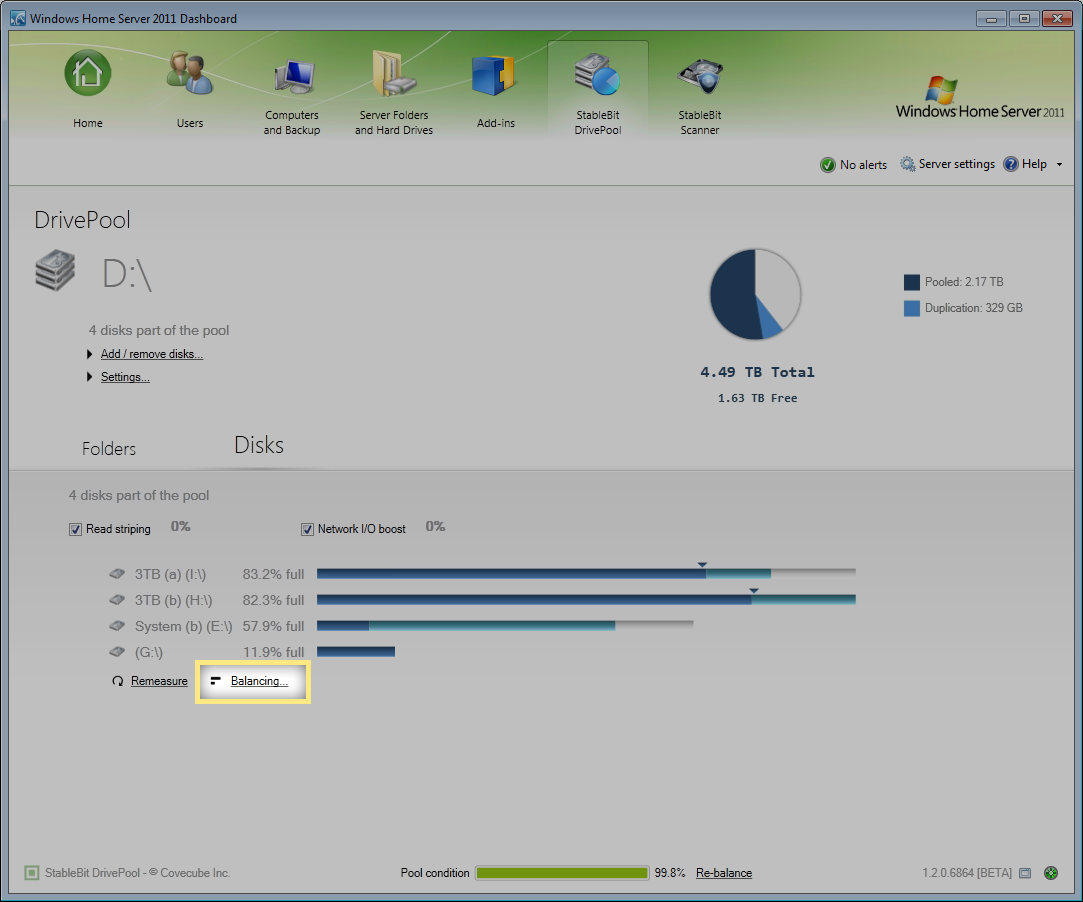
Balancing

I should note that everything is set up properly out of the box and you really don’t need to delve into any of the settings that I’ll be describing shortly if you’re just interesting in the “it just works” user experience.

The more advanced functions that I’m going to describe here are for those of you who want a bit more control over DrivePool.

Balancing Settings
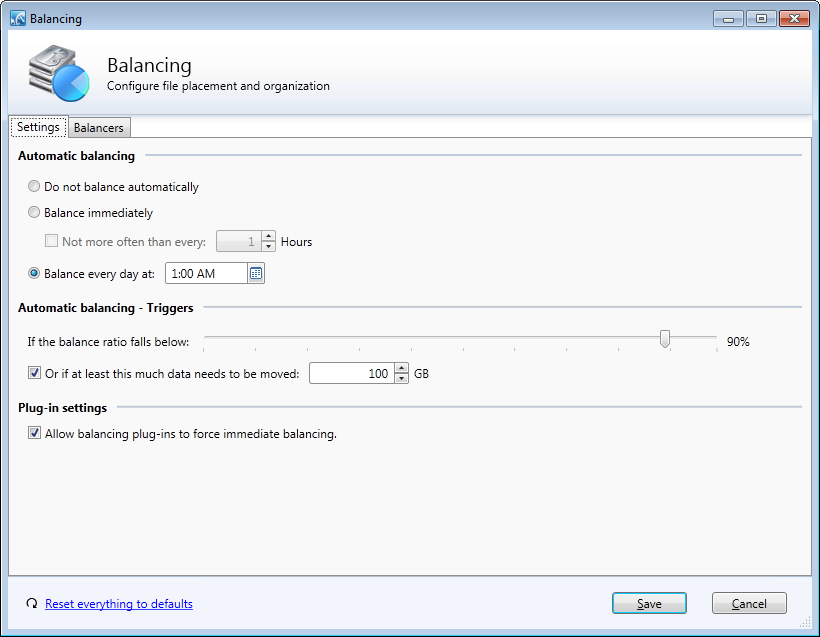
Balancing Settings

The new DrivePool BETA now features a Balancing Settings tab under the balancing window. Here you can configure when you want to allow the automatic balancing process to run and the conditions that trigger it.

You can also control whether balancers can force a balancing run at any time, regardless of the triggers that you set up. The StableBit Scanner makes use of this and we’ll talk about that shortly.

Reset to Default

If you’ve been experimenting with the new balancing settings or balancers and you think that you might have “messed something up”, don’t worry. Just click Reset everything to defaults and then click Save. Everything will be reset back to normal. This includes the balancing settings, the balancer order, whether each balancer is enabled or not and each balancer’s individual settings.

Basically, absolutely everything about balancing will be reset to the out of the box experience.

StableBit DrivePool + Scanner Integration
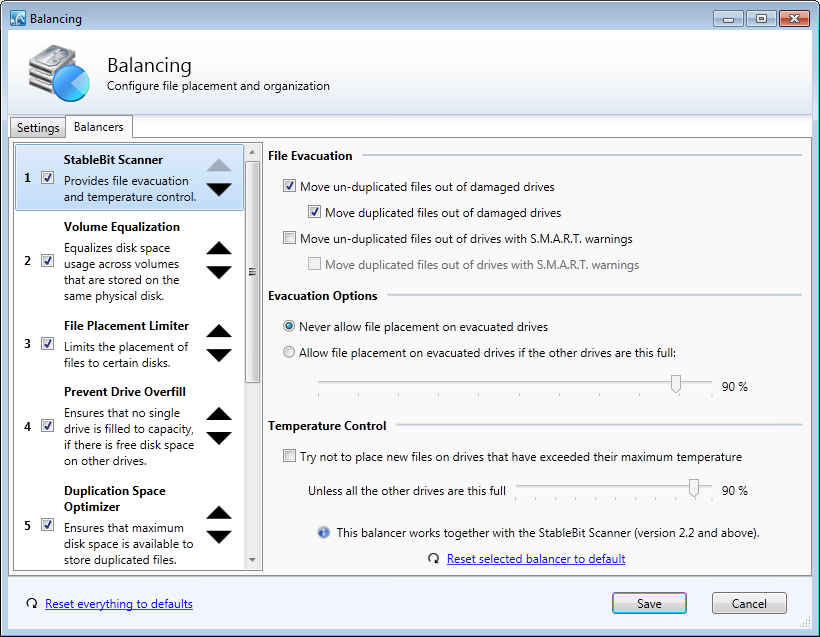
StableBit Scanner – Balancer

DrivePool 1.2.0.6864 now includes a new built-in balancer that provides integration features with the StableBit Scanner.

The new balancer is responsible for 2 things, File Evacuation and Temperature Control. Let’s talk a bit about how these work.

File Evacuation

As soon as any problems are detected with one of your drives by the StableBit Scanner, DrivePool will start moving your files out of the compromised drive to the other drives in the pool.

It does this using the existing balancing framework, which means that all your files will remain available on the pool during this process. Nothing needs to be unmounted for file evacuation to work.

You can choose whether to evacuate files as soon as an unreadable sector is detected, or when a S.M.A.R.T. warning is issued. You can also select whether to evacuate just un-duplicated files or all pooled files.

All file evacuation features are optional and can be enabled or disabled by the user at any time. By default we evacuate all pooled files as soon as the StableBit Scanner detects an unreadable sector on any one of your disks.

It’s worth noting that because duplicated files are already protected by the virtue of being available on multiple hard drives, file evacuation is not as critical for duplicated files. But by evacuating all of the pooled files from a compromised drive ahead of time, including duplicated files, you are not only protecting them from multiple consecutive drive failures but are facilitating faster and safer drive removal.

Evacuation Types

By default, the limit placed on the compromised drive by the StableBit Scanner balancer is a bit different than a limit that you would normally set using the File Placement Limiter.

When you limit file placement on a certain drive by using the built-in File Placement Limiter, the limit will only be respected if there is enough space on all the other drives in the pool to hold all of the limited files. If there isn’t, the limit will be broken and files will be allowed to go onto the limited drive in order to keep the pool functioning.

For example, if you have 2 1TB drives in the pool and there is 500GB of un-duplicated files on the pool, you can easily limit the storage of those files to only one of those drives. But if you copy another 1TB worth of data onto the pool, the system will break your limit instead of showing you an “out of disk space” message.

In DrivePool this is called a “soft limit”.

However, with the StableBit Scanner we assume that the drive’s integrity is compromised and that it’s not safe to store new data on the drive any longer. So we set a “hard limit” instead. In other words, even if all of the other drives in the pool are completely full, no new files will be placed on the compromised drive.

You can change this to a “soft limit” in the settings pictured above.

Note that if your pool doesn’t have enough free space to evacuate all the files from the compromised drive in the first place, DrivePool will have no choice but to leave the pooled files on that drive.

Temperature Control

Another aspect of the StableBit Scanner balancer is temperature control.

Using the StableBit Scanner, DrivePool monitors the drive temperature of each drive in the pool and dynamically hints to the real-time file placement algorithm where to place new files.

The limit will be respected as long as there are other cooler drives in the pool with sufficient free space.

This process can force files to be placed on a “non-optimal” disk, as determined by the balancers below it. In this case, the new files will be moved to the most optimal disk on the next re-balancing run.

Temperature control is disabled by default, but you can easily enable it if you like this feature.

An Immediate Balancer

The StableBit Scanner balancer is different than any other balancer written for DrivePool so far in that it forces a balancing run immediately if it needs to evacuate files, regardless of what your automatic balancing triggers are set to.

We do this because it is prudent to start moving your data off of any compromised drives as quickly as possible. This behavior can be controlled by the user in the aforementioned balancing settings tab.

DrivePool Balancing Plug-ins

Right now, DrivePool ships with 5 built-in balancers. But in addition to the built-in balancers, DrivePool can now accept 3rd party balancing plug-ins which can be installed at any time.

Today there are 2 balancing plug-ins available for download from our development wiki.

Get DrivePool balancing plug-ins here:
http://wiki.covecube.com/StableBit_DrivePool_-_Download_Balancing_Plugins

Let’s briefly talk about each plug-in and what it does.

Disk Space Equalizer

Disk Space Equalizer

DrivePool comes with some sophisticated built-in balancing algorithms out of the box, but some people want something much simpler. They simply want all of their drives in the pool to be used equally.

Well, that’s exactly what the Disk Space Equalizer does. It can equalize either by the free space available on each disk or by the percentage of disk space used.

It’s a very simple plug-in and there’s really nothing more to it.

Archive Optimizer
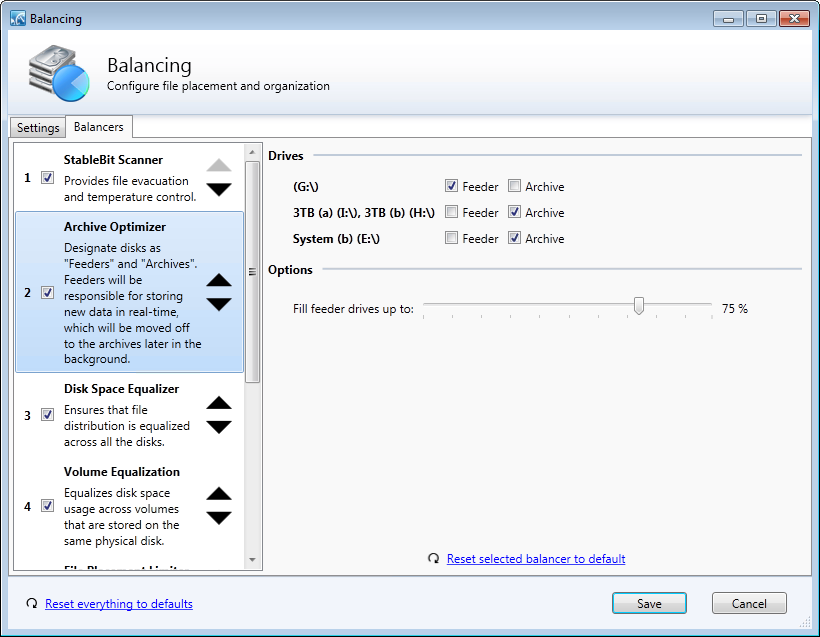
Archive Optimizer

This one is a bit more interesting. Here the idea is that you are using your pool to archive data and would like to optimize, or speed up, the process of placing new data into your archive.

The plug-in is designed around the idea that most of your high capacity disks, that are used for archival storage, are slow. While at the same time you have one or more faster disks that you would like to use for copying new data to the server.

In the Archive Optimizer plug-in you group your pooled disks into “Feeder” disks and “Archive” disks. All new data will be written to the fast feeder disks and the balancing system will move the data from the feeder disks to the much slower archive disks some time later.

You can set up a schedule to balance overnight, or when a certain amount of data needs to be moved in the overall balancing settings tab.

The obvious use for this is with SSDs.

You can add one or two SSDs to the pool and have those serve as “landing zones” for new files giving you super fast write times. You can even combine this with read striping for an even greater boost in performance.

Write Your Own Balancing Plug-in

Writing your own balancing plug-in is simple. All you need is Visual Studio 2010 and WiX 3.6 (for packaging).

To get started, visit the development wiki at:
http://wiki.covecube.com/StableBit_DrivePool_-_Develop_Balancing_Plugins

There’s a sample solution there with a step by step readme on how to get your plug-in set up and compiled into a .wssx installation file.

It’s really easy and you could have a plug-in written in a day.

What’s Next

There are a lot of BETAs out right now. Next we’ll start moving everything towards release final builds.

The DrivePool BETA may get an extended testing period due to multiple pool support, if that makes it into the current release cycle. If not, it will ship in the next version, which will be version 1.3.


from Covecube http://blog.covecube.com

Thursday, September 13, 2012

Intel's Core i3 NUC mini-boards set to hit market in October, power up hobbyists and OEMs

http://www.engadget.com/2012/09/13/intels-core-i3-nuc-mini-boards-set-to-hit-market-in-october-po/

Intel's Core i3 NUC miniboards set to hit market in October, power up enthusiast projects

Intel has finalized the specs of its Next Unit of Computing (NUC) board, and announced it'll go on sale in October for less than $400 with a case and power supply. Carrying a 4 x 4-inch form factor between a Raspberry Pi and mini-ITX board, it'll be equipped with a Core i3 Ivy Bridge processor, HD 4000 graphics, two SO-DIMM sockets, an M-SATA slot for an SSD drive, three USB ports, one HDMI port and a mini-PCI slot for wireless connectivity. Two different models will be offered by the chip giant, identical except that one will be Thunderbolt equipped and the other will sport an ethernet port for connectivity. Originally intended for the kiosk and signage markets, enthusiast interest compelled Intel to put the board on general sale, along with a case (pictured above) and power supply option. That'll pit it against offerings from VIA and others, while offering considerably more oomph in a similar form factor -- though a mini-server slaying Core i5 option originally proposed by Intel was dropped.

[Image credit: PC World]

Filed under: ,

Intel's Core i3 NUC mini-boards set to hit market in October, power up hobbyists and OEMs originally appeared on Engadget on Thu, 13 Sep 2012 12:31:00 EDT. Please see our terms for use of feeds.

Permalink   |  sourcePC World  | Email this | Comments

from Engadget http://www.engadget.com

HP Envy Spectre XT review: a sleek and speedy Ultrabook with a killer keyboard

http://www.engadget.com/2012/09/13/hp-envy-spectre-xt-review/

HP Envy Spectre XT a 13inch Ultrabook

HP's Envy 14 Spectre hit almost all the right notes when we reviewed it back in March, thanks to its high-res display, sleek metal-and-glass design and brisk performance, but a stiff trackpad and the steep $1,400 price were clear downsides. The new Envy Spectre XT, a 13.3-inch Ivy Bridge-powered Ultrabook, has a thinner, lighter profile than its big brother, and a lower $1,000 price tag to match. That's still not chump change, though, so does the XT deserve a spot in the top tier of Intel-approved ultraportables? Join us past the break for the full breakdown.

Continue reading HP Envy Spectre XT review: a sleek and speedy Ultrabook with a killer keyboard

Filed under:

HP Envy Spectre XT review: a sleek and speedy Ultrabook with a killer keyboard originally appeared on Engadget on Thu, 13 Sep 2012 12:00:00 EDT. Please see our terms for use of feeds.

Permalink   |   | Email this | Comments

from Engadget http://www.engadget.com

Nintendo's Wii U up close and personal: a photo tour

http://www.engadget.com/2012/09/13/nintendos-wii-u-up-close-and-personal-a-photo-tour/

Nintendo

We're here at Nintendo's Wii U event in New York City where the gaming outfit's prexy Reggie Fils-Aime just announced US pricing and release details for the console, as well as it's own unique TVii service. And now that those important tidbits have been squared away, it's time to focus on the hardware. Yes, you may have seen the Wii U console many times before, but the House that Mario built's been notoriously stingy about giving media access to a non-tethered unit. Well, the time has come to see nearly every facet of this next-gen contender. As you'll note in the gallery below, the only area the Big N wouldn't let us photograph is this Premium version's backside. For whatever reason, the company doesn't want those ports shown, but we can tell you what they consist of: AC adapter, AV multiout, sensor bar, HDMI out and what looks like two ports for USB. Undecided on whether you should be placing that pre-order right about now? Then take a tour of this onyx pair and see if it changes things any.

Filed under:

Nintendo's Wii U up close and personal: a photo tour originally appeared on Engadget on Thu, 13 Sep 2012 11:52:00 EDT. Please see our terms for use of feeds.

Permalink   |   | Email this | Comments

from Engadget http://www.engadget.com

Wednesday, September 12, 2012

University builds cheap supercomputer with Raspberry Pi and Legos

http://arstechnica.com/information-technology/2012/09/university-builds-cheap-supercomputer-with-raspberry-pi-and-legos/

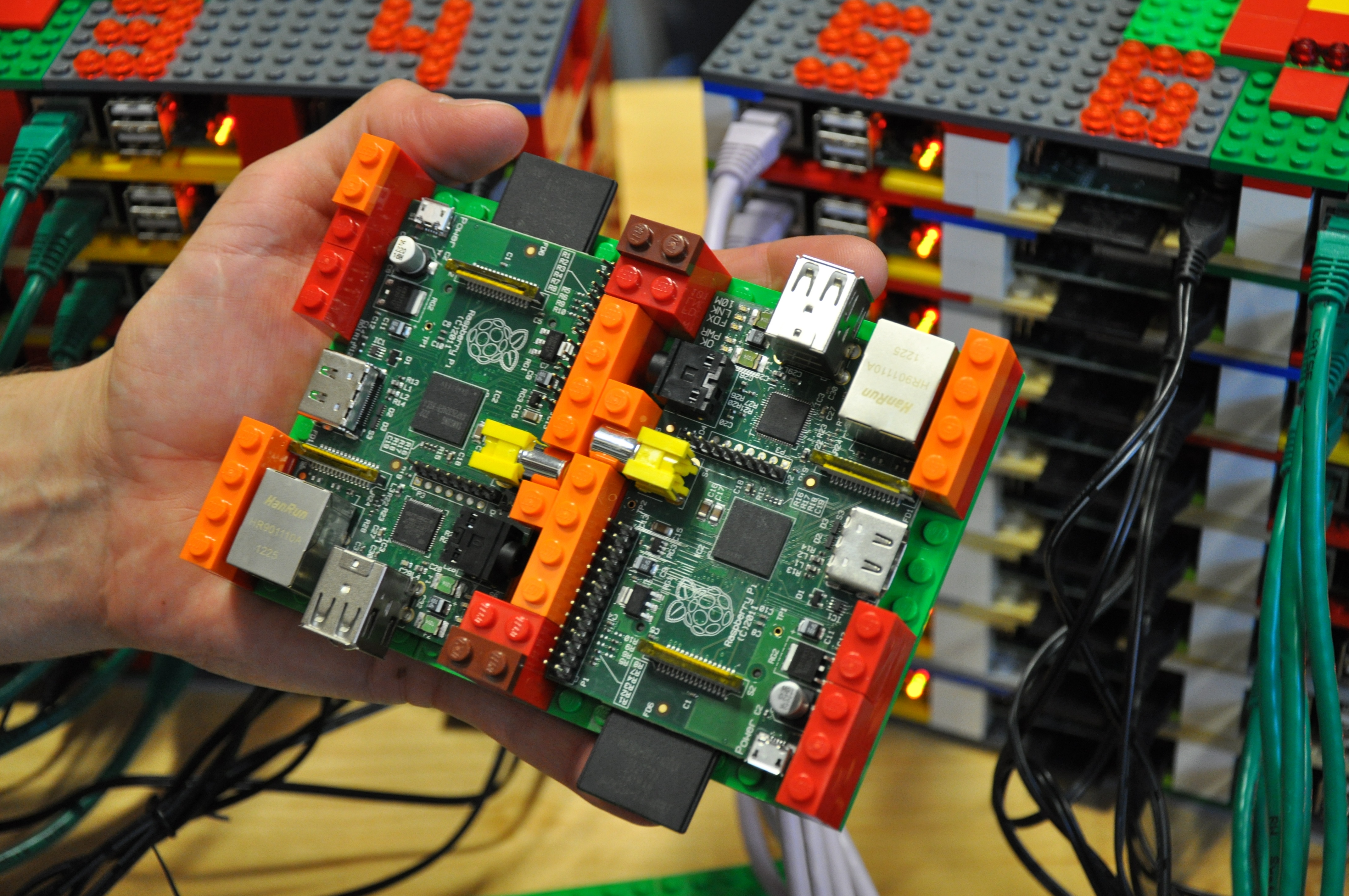
Professor Simon Cox of the University of Southhampton and his son and system racking consultant, James, with their Raspberry Pi-based "supercomputer."

Inspired by the low-cost computing power of the Raspberry Pi, a team at the University of Southampton has used the ARM-based Linux computer-on-a-board as a building block for a low-cost supercomputer—racked and stacked using Lego blocks. And they’ve published a step-by-step guide for anyone interested in creating their own Raspberry Pi high-performance computing “bramble."

Led by Professor Simon Cox, with Lego expertise lent by Cox’s 6-year old son James (who spent the summer learning to program on the Raspberry Pi using Python and MIT's Scratch), the team used 64 Raspberry Pi computers, each equipped with a 16-gigabyte SD card to construct a functioning computing cluster for under £2,500 (a bit over $4,000)—not including the Ethernet swtiches used to connect the nodes.

Enlarge / A pair of Raspberry Pi compute nodes in their Lego racking enclosure.

“As soon as we were able to source sufficient Raspberry Pi computers,” Professor Cox said, “we wanted to see if it was possible to link them together into a supercomputer. We installed and built all of the necessary software on the Pi starting from a standard Debian Wheezy system image and we have published a guide so you can build your own supercomputer.”

Read 1 remaining paragraphs | Comments


from Ars Technica http://arstechnica.com

In wake of anti-Islam video, Afghanistan blocks film's YouTube page

http://arstechnica.com/tech-policy/2012/09/in-wake-of-anti-islam-video-afghanistan-blocks-youtube/

The government of Afghanistan has banned the YouTube page of the deeply offensive and anti-Islamic video, known as “Innocence of Muslims.”

Originally, Ars and other media outlets had reported Afghanistan had blocked all of YouTube. That report was subsequently corrected on Twitter by Aimal Faizi, chief spokesperson for President Hamid Karzai.

"Afghanistan has not banned [the] YouTube website," he wrote. "[The Minister of Information and Communications] had asked [the Ministry of Communications] to ban the video insulting the Prophet Mohammad in YouTube, not YouTube," he wrote.

Read 9 remaining paragraphs | Comments


from Ars Technica http://arstechnica.com

Ambassador to Libya killed in consulate attack

http://www.airforcetimes.com/news/2012/09/ap-libya-ambassador-killed-benghazi-consulate-attack-091212/

TRIPOLI, Libya — The U.S. ambassador to Libya and three American members of his staff were killed in the attack on the U.S. consulate in the eastern city of Benghazi by protesters angry over a film that ridiculed Islam’s Prophet Muhammad, Libyan officials said Wednesday.

from Air Force Times - News http://www.airforcetimes.com/rss_news.php

Sunday, September 9, 2012

Server 2012 Storage Spaces-Testing the RTM Version

http://thedocsworld.net/server-2012-storage-spaces-testing-the-rtm-version/

Intro and Test Setup Following in the tradition of testing each release, here is a summary of the testing I did on the RTM version of Server 2012 Storage Spaces.  Since this has the final code, the hope was that it was tuned and tweaked to provide the maximum performance and stability.   Issues Right [...]

from The Doc's World http://thedocsworld.net

Friday, September 7, 2012

Sony Stitch merges footage from two 4K F65 cameras to create zoomable panoramic with HD output (video)

http://www.engadget.com/2012/09/07/sony-stitch-4k-hands-on/

Sony Stitch merges footage from two 4K F65 cameras to create zoomable panoramic with HD output handson video

Well, that's a mouthful of a headline. Going a bit more in-depth, a new professional solution from Sony allows broadcasters to capture side-by-side 4K video at, say, a sporting event, then use a standard camera zoom device to select small portions of each feed for 720p or 1080i output. On the receiving end, you'll see a live image that looks indistinguishable from something you'd capture with a moving camera, with a few extra benefits to boot. Sony demonstrated the system using feeds from an F65 4K camera earlier this year at NAB, but was only able to present a simulation at that point, with pre-recorded output cropped from larger-format footage.

Now, as we saw today at IBC in Amsterdam, the technique works in realtime, so an adjustable smaller portion of the video is pumped out seamlessly and instantaneously. The 4K video can also be recorded at full resolution simultaneously, letting you change the framing long after an event takes place. Sony only had the demo configured to pull live video from the left portion of the feed, but eventually the entire capture will be enabled, giving producers access to an entire football field, as you'll see in the hands-on video after the break. We wouldn't expect this solution to replace human camera operators anytime soon, but it's certainly a viable method for adding angles and placing a bit more control in the hands of production teams, even after the fact.

Continue reading Sony Stitch merges footage from two 4K F65 cameras to create zoomable panoramic with HD output (video)

Filed under: , ,

Sony Stitch merges footage from two 4K F65 cameras to create zoomable panoramic with HD output (video) originally appeared on Engadget on Fri, 07 Sep 2012 10:41:00 EDT. Please see our terms for use of feeds.

Permalink   |   | Email this | Comments

from Engadget http://www.engadget.com

Archives of LDS General Conference

http://ldsmediatalk.com/2012/09/07/archives-of-lds-general-conference/?utm_source=feedburner&utm_medium=feed&utm_campaign=Feed%3A+LDSWebGuy+%28LDS+Media+Talk%29

This article summarizes where to find archives of the text, audio, video, and music of general conferences of The Church of Jesus Christ of Latter-day Saints.

Conference Text

Conference.lds.org has conference talks in English back to 1971 in HTML, PDF, and EPUB. Many other languages also appear in these same formats but not all the way back to 1971.

BYU has a collection of General Conference talks that lets you search the 24 million words in the 10,000 talks given from 1851 to 2010 in English.

The Church History Department has scanned all the General Conference Reports in English since 1880 and placed them online in the Internet Archive, a non-profit Internet library.

BYU’s LDS Scripture Citation Index (scriptures.byu.edu) has the text from conferences from 1941 to the present. You can search them or check references in all conferences to a given scripture passage.

Conference Video and Audio

Conference.lds.org has video and audio in English from 1971 to the current conference. Video back to 2008 is also available in more than 70 languages. Some missing sessions will be filled in over the next few months.

Conference Music

Go to a specific conference at conference.lds.org and then click “Show Music” at the top of the page to see the music performed at the conference by the Mormon Tabernacle Choir and other choirs. You can then choose to watch, listen, or download the music.

You can also see an index of all the music by clicking “All Music” in the left-hand navigation at conference.lds.org (or go there directly at GCmusic.lds.org). In the index, you can search across multiple archives and conferences. Listen to the music by clicking the Play button at the beginning of any row or download the music by clicking the download link at the end of the row.

The archive goes back about 18 years, and more music is being added all the time.

Other Channels

You can access general conference archives both online and offline using the Church’s Gospel Library mobile app and the Mormon Channel on Roku, iTunes, and YouTube.


from LDS Media Talk http://ldsmediatalk.com

How Kansas City taxpayers support Google Fiber

http://arstechnica.com/tech-policy/2012/09/how-kansas-city-taxpayers-support-google-fiber/

Google Fiber: the price is certainly right.
Google

On Wednesday, Republican FCC commissioner Ajit Pai released a statement praising the Google Fiber project as a model for other metropolitan areas to follow. He argued that it shows that "it is critically important that states and local communities adopt broadband-friendly policies when it comes to rights-of-way management."

Fred Campbell, a former FCC official who now hangs his hat at the Competitive Enterprise Institute, has been singing a similar tune in recent weeks. He portrays the Google Fiber project in Kansas City as a triumph for free markets, once government gets out of the way. "Deregulation promotes private investment," he writes in a recent analysis of the broadband network. He regards the Google project's apparent success as a rebuke to groups like Public Knowledge and Free Press, which advocate a more active government role in developing and regulating broadband networks.

Yet closer examination of the Google Fiber project reveals a more complex story. It's true that the Google Fiber project hasn't developed the way many liberal groups wanted it to. But it's important not to gloss over the fact that Kansas City's support for Google's network went well beyond deregulation to outright corporate welfare. It's hardly an example of the free market in action.

Read 10 remaining paragraphs | Comments


from Ars Technica http://arstechnica.com

VIA EPIA-P910 stuffs 3D display support, quad-core into a Pico-ITX size

http://www.engadget.com/2012/09/07/via-epia-p910-stuffs-3d-display-support-quad-core-into-pico-itx/

VIA EPIAP910 stuffs 3D display support, quadcore into a PicoITX size

If there's been a race in the Pico-ITX realm to catch up to full-size PCs, VIA just leapt ahead by a few bounds with the EPIA-P910. The tiny PC mates one of VIA's 1GHz QuadCore E-Series processors with a VX11H media core to handle the kinds of tasks that would break just about any other system its size: stereoscopic 3D displays and DirectX 11 3D graphics are entirely within the realm of possibility. Likewise, there's a surprising amount of expansion headroom compared to many of the P910's similarly small counterparts, such as the 8GB RAM ceiling and support for both HDMI 1.4a and USB 3.0. You'll need to get in touch with VIA if you want to find out how much it costs to work the new EPIA into an embedded PC, and it's more likely to be headed to corporate buyers than to homebrew projects. We're still looking forward to the shot of visual adrenaline, whether it's in a mini PC or a store display.

Continue reading VIA EPIA-P910 stuffs 3D display support, quad-core into a Pico-ITX size

Filed under: ,

VIA EPIA-P910 stuffs 3D display support, quad-core into a Pico-ITX size originally appeared on Engadget on Fri, 07 Sep 2012 01:44:00 EDT. Please see our terms for use of feeds.

Permalink   |  sourceVIA  | Email this | Comments

from Engadget http://www.engadget.com

MediawavePC's MW6110 is a multipurpose Intel Core i7-supporting media player

http://www.engadget.com/2012/09/07/mediawavepcs-mw6110-media-center/

MediawavePC's MW6110 is a multipurpose intel Core i7supporting media player

Nettops and media-center PCs in many ways hang on opposite sides of the same saddle. MediawavePC's new MW6110 "Ultra Small Media Player" tightens the straps between these two types of machines, and adds an extra satchel with it. The 7.87 x 7.28 x 1.57-inch form gives it a discreet footprint, and supports Intel's Core i3- i5- and i7 chips. You can also add-in up to 16GB of DDR3 RAM, along with 1TB of storage. Connection-wise, you're well looked after with 6 USB ports, HDMI, LAN, plus Audio in / out and WiFi. So, plenty of scope to configure to suit your needs -- you'll just need the $499 base price to get started.

Continue reading MediawavePC's MW6110 is a multipurpose Intel Core i7-supporting media player

Filed under: , ,

MediawavePC's MW6110 is a multipurpose Intel Core i7-supporting media player originally appeared on Engadget on Fri, 07 Sep 2012 00:40:00 EDT. Please see our terms for use of feeds.

Permalink   |  sourceMediawavePC  | Email this | Comments

from Engadget http://www.engadget.com

Thursday, September 6, 2012

Kindle Fire HD 7-inch hands-on (Update: video)

http://www.engadget.com/2012/09/06/kindle-fire-hd-7-inch-hands-on/

Kindle Fire HD 7inch handson

As expected, the big news at today's gadget-filled Amazon event is the successor to the Kindle Fire, which was launched in New York, roughly this time last year. It's not the Fire 2, however -- this is the Kindle Fire HD. It's clear the minute you grab hold of it that Amazon wanted to start over with this device in a number of ways. There's none of that OEM build quality from the first go-round. This is a nice, slim device that really feels as though it can stand up to some of the nicer Android tablets out there -- we'd certainly put our initial impressions of build up there with the Nexus 7.

The corners of the tablet are more rounded than its predecessor, with a glossy bezel going around the display -- a little bit of the rubberized backing creeps out on top of this. There are no buttons here, however. If you want to effect the screen, give it a tap and you get a small virtual menu on the side. As advertised, the display is quite vivid. Amazon talked up the decrease of glare, though it was a bit hard to tell just how successful the company was, given the fact that we're indoors. The device has a matte rear, with that stereo speaker going down a line in a middle, vents on either side.

Performance-wise, this seemed pretty snappy, and we got the pre-loaded (at least on Amazon's own tablet) Hunger Games movie to load quite quickly, thanks no doubt to all of the investment the company put into the WiFi side of this device. Interestingly, there was a little lag as we were flipping through the pages of a book, with the Fire doing a little loading every few pages or so.

Continue reading Kindle Fire HD 7-inch hands-on (Update: video)

Filed under:

Kindle Fire HD 7-inch hands-on (Update: video) originally appeared on Engadget on Thu, 06 Sep 2012 15:15:00 EDT. Please see our terms for use of feeds.

Permalink   |   | Email this | Comments

from Engadget http://www.engadget.com

Amazon announces $499 Kindle Fire HD with 4G LTE, $50 a year for 250MB monthly

http://www.engadget.com/2012/09/06/kindle-fire-hd-4g-lte/

Amazon announces $499 Kindle Fire HD with 4G LTE on AT&T

More tablets with more ways to connect! Jeff Bezos has just announced another flavor of the Kindle Fire HD, this one offering connectivity to AT&T's 4G LTE network. It's the 8.9-inch model, meaning you're paying a $200 premium for that LTE antenna. But, Amazon has paired that with an absolutely killer data deal. For $50 a year you'll get 250MB monthly. AT&T's current data plans would have you paying $14.99 monthly for that much data. If we were a mathematician we'd say that's a savings of 129.88 a year. But, since we're not, we'll just say that sounds like good value to us. The Kindle Fire HD with 4G LTE will be available for pre-order today, shipping on November 20th.

Follow the Amazon liveblog here!

Filed under:

Amazon announces $499 Kindle Fire HD with 4G LTE, $50 a year for 250MB monthly originally appeared on Engadget on Thu, 06 Sep 2012 14:53:00 EDT. Please see our terms for use of feeds.

Permalink   |   | Email this | Comments

from Engadget http://www.engadget.com

Amazon outs X-ray for Textbooks, 'smart glossary' for all of your learning needs

http://www.engadget.com/2012/09/06/amazon-outs-x-ray-for-textbooks-smart-glossary-for-all-your-l/

Amazon outs Xray for Textbooks, 'smart glossary' for all your learning needs

Ever wanted Amazon's X-ray for books to play nice with those school publications as well? If so, you're in the luck. The outfit announced today that X-ray for Textbooks will provide a library of terms to lend a hand with your studies alongside a similar function for movies that's powered by IMDB. Of course, the helpful tech will land with the trio of new slates that were also unveiled at the event.

Filed under: ,

Amazon outs X-ray for Textbooks, 'smart glossary' for all of your learning needs originally appeared on Engadget on Thu, 06 Sep 2012 14:48:00 EDT. Please see our terms for use of feeds.

Permalink   |   | Email this | Comments

from Engadget http://www.engadget.com

Amazon unveils Kindle FreeTime, gives kids their own space to play

http://www.engadget.com/2012/09/06/amazon-unveils-kindle-freetime-gives-kids-their-own-space-to-pl/

Amazon unveils Kindle FreeTime, gives kids their own space to play

Amazon just solved one of the bigger dilemmas for parents buying that new Kindle Fire HD -- how to keep the kids in a safe zone for content. It's introducing Kindle FreeTime, a special mode that makes it easier for younguns to navigate while letting the adults create separate profiles dictating what children can access and for how long. The filters are separated by media type, and Amazon even turns the background from black to blue to reassure parents by the glow of the screen on Junior's face. We'd call the parental control a long overdue feature, although we're sure Amazon also sees it as a chance to scoop up an extra Kindle Fire sale or two among families.

Follow the Amazon liveblog here!

Filed under:

Amazon unveils Kindle FreeTime, gives kids their own space to play originally appeared on Engadget on Thu, 06 Sep 2012 14:37:00 EDT. Please see our terms for use of feeds.

Permalink   |   | Email this | Comments

from Engadget http://www.engadget.com